Grain Studios: Maestro Hero
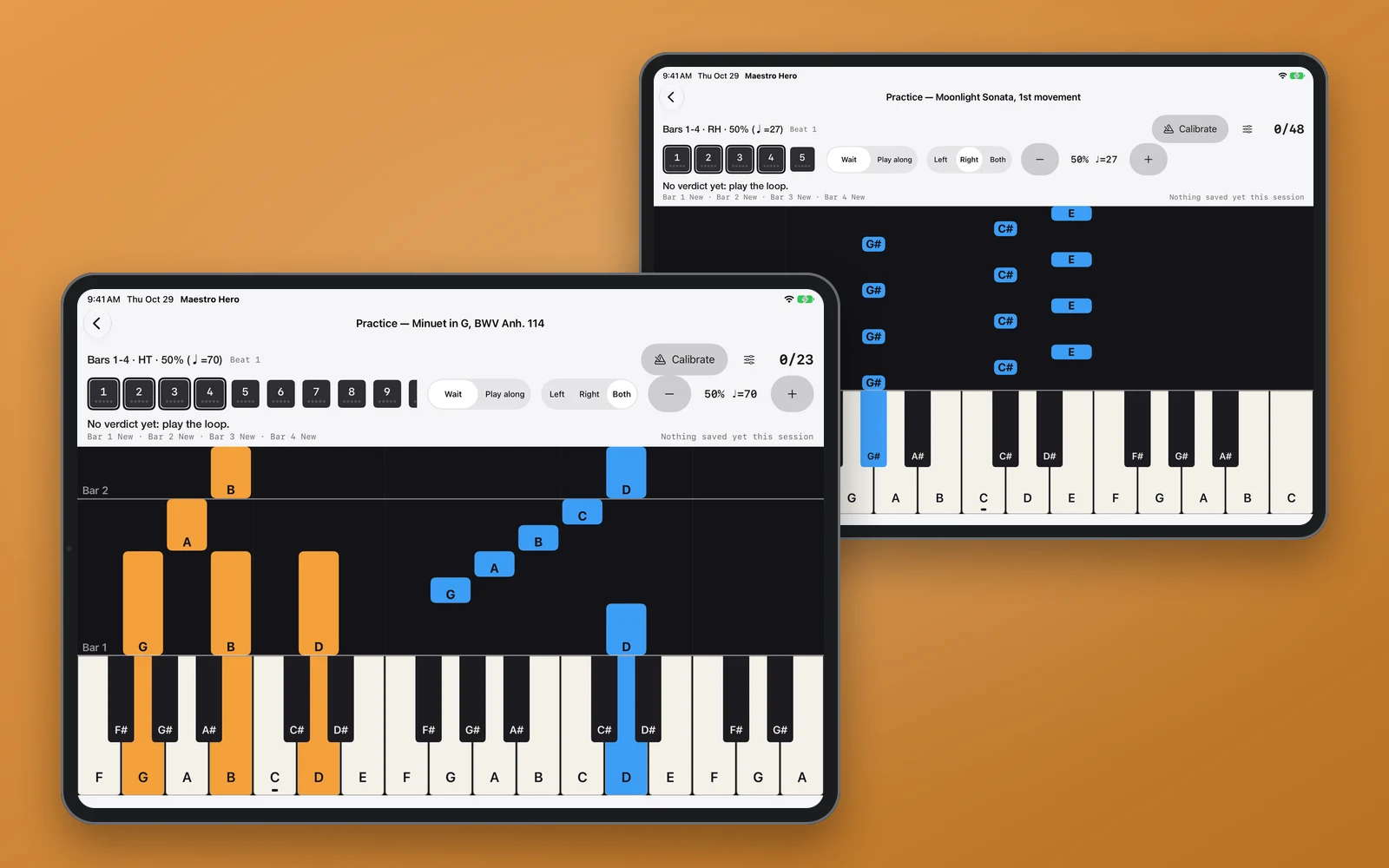
Learn real piano with falling notes on an iPad. It waits for the right key, grades each bar, and tells you the next thing to practice: drill a bar, slow down, switch hands, or move on.
- Role
- Designer & Developer
- Platform
- iPadOS
- Industry
- Music & Education
- Focus
- Product Design & iPad Engineering
Project Overview
Maestro Hero teaches piano the way rhythm games teach guitar: notes fall toward a keyboard, and you play them as they land. I built it for one beginner first, me. I can't read music, and the goal was to play the opening of Beethoven's Moonlight Sonata on a real keyboard.
You can play on the iPad's glass, or plug in a USB MIDI keyboard. In Wait mode the music stops until you press the right key, so you learn the notes before the timing. Play along runs at tempo and grades the timing.
The library holds fourteen public-domain pieces: Für Elise, Bach's Prelude in C, Chopin preludes, Tchaikovsky's Album for the Young, Clementi, Burgmüller and more. I transcribed each one by hand and marked which hand plays every note, so practicing hands separately always works. You can also import your own MIDI files.
Key Features
- →Wait mode: the song holds until you press the right key, on the glass keyboard or a USB MIDI keyboard
- →Play along at tempo, graded on timing
- →Every loop graded bar by bar, then one clear next step: drill a bar, slow down, repeat, speed up, switch hands, combine hands, or advance
- →Practice loops follow each piece's real musical phrases, not arbitrary four-bar blocks
- →Left, right or both hands, with a tempo ladder that climbs as you get it right
- →A bar counts as mastered only when both hands play it together at full tempo
- →Progress: mastered bars by week
- →Fourteen hand-transcribed public-domain pieces, plus import of your own MIDI files
- →Wait mode is playable with VoiceOver, and every screen holds up at the largest text sizes
Design Approach
The trap with apps like this is a pretty falling-notes screen that scores you at full speed and never says which bar went wrong. You practice the whole piece, fail it the same way every time, and quit. So the app is built around one question, asked after every loop: is this bar mastered? The answer decides what comes next.
The stage is always dark, whatever the system theme, so the falling notes read as light. The two hands get two colors, blue for right and orange for left, chosen to stay distinct for color-blind players and to pass contrast against the dark lane. Because blue means the right hand, nothing else in the interface is blue. Buttons and accents use ink in light mode and ivory in dark mode.
It's designed landscape-first, because that's how the iPad mostly gets used: on a stand at the keyboard. One rule held through every layout change: nothing may resize the stage in the middle of a loop, because a resize pauses the clock and cuts off notes that are still sounding.
Design Screens
Outcome
Maestro Hero is headed to the App Store for iPad.
Wait mode, play-along, bar-by-bar mastery, MIDI keyboard input, weekly progress and the fourteen-piece library are built and running on my own iPad. It has no accounts, no network and no tracking.