Grain Studios: RailMind
A no-AI, touch-driven Kato Unitrack layout editor for iPad — N and HO scale. Lay track with your fingers, snap pieces together exactly the way the real Unijoiners do, price out what you'll need from Kato's published MSRP, and save your plan. Fully offline: no account, no network, no AI.
- Role
- Designer & Developer
- Platform
- iPadOS
- Industry
- Hobby & Tools
- Focus
- Track Planning
Project Overview
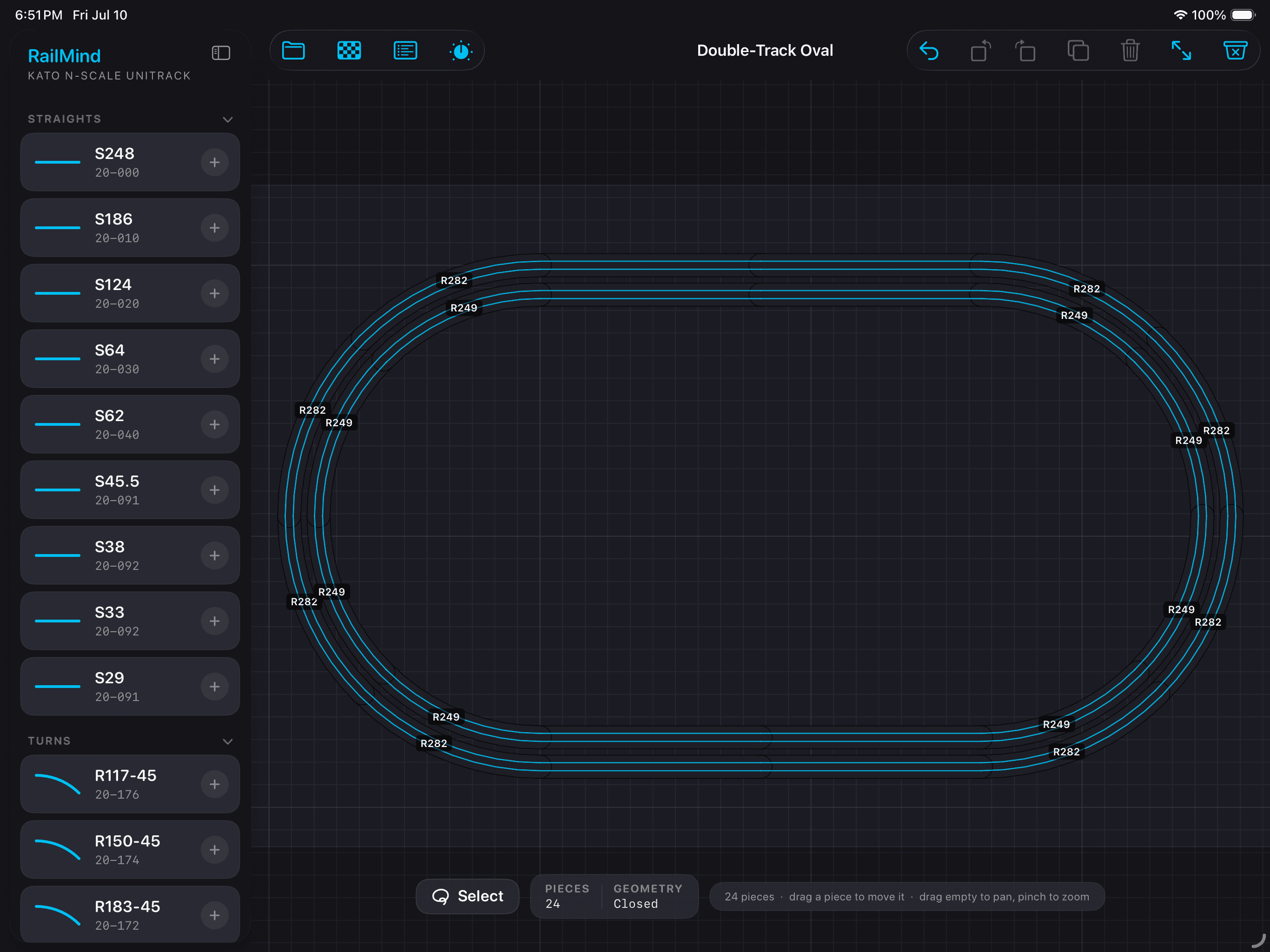
RailMind is a track planner for people who actually build the layout. It lays real Kato Unitrack — N and HO — on a snap-together canvas where every piece connects only where real track physically can, so what you draw, you can build. You start from an example layout or from scratch, pull straights and curves from a palette keyed to Kato part numbers, and the plan keeps a running parts list priced from Kato's published catalog. It is deliberately not an AI tool: no account, no network, no suggestions. The one piece of automation is a geometric solver that closes a gap in track when you ask it to.
Key Features
- →Track-piece palette of real Kato Unitrack in N and HO — straights (S248–S29) and curves (R117-45 and up), each labeled with its exact Kato part number
- →Snap-together canvas where pieces connect only where real track physically can — plan it here, build it on the table
- →Twelve example layouts to start from — nine N, three HO — each opened as your own editable copy
- →Parts list priced from Kato's published MSRP (catalog #25-110) divided by real pack size — presented as a planning estimate, because Kato sells track in packs and street prices vary
- →An auto-router that closes a gap in track using an A* search over real piece geometry — a deterministic solver, offline, no model involved
- →Fully offline by design — no account, no network calls, no AI, no ads
Design Approach
Every existing Unitrack planner is either a desktop CAD tool or a web toy that ignores real geometry. I wanted something you could use at the hobby shop or next to the layout table, so iPad was the only platform that made sense.
The core constraint shaped the entire design: every connection in the app maps to a real Unitrack joiner. No freeform drawing, no approximate curves. If two pieces snap together on screen, they snap together on the table. That physical fidelity is the product — without it, a planner is just a drawing tool that lies to you.
The palette is organized by Kato part number because that is how hobbyists think about and buy track. Sample layouts are tiered by complexity so a beginner can open a Starter Oval and start editing immediately, while an experienced builder can start from scratch. The parts list prices everything from Kato's published MSRP so you know what a layout will cost before you order.
The only automation is an A* solver that closes a gap in track using real piece geometry. No AI, no suggestions, no account, no network. A tool that respects the person using it.
Design Screens
Outcome
RailMind is the first iPad-native Kato Unitrack planner — touch-first, fully offline, geometry-accurate. It covers N and HO scale with twelve example layouts and a complete parts catalog.
The auto-router reliably closes gaps that would take manual trial-and-error with dozens of piece combinations. The parts list has saved hobbyists from over-ordering by showing exactly what a layout needs, priced from Kato's own catalog.
Approved for the App Store. Built in SwiftUI with a custom 2D geometry engine for track placement, snap detection, and the A* gap solver.